
Artificial intelligence is quickly becoming part of everyday customer service. It can answer common questions, route calls, schedule appointments, collect information, and help customers outside normal business hours. For a busy company—especially a small business with a lean team—that kind of support can make a meaningful difference.
But faster service is not the same as better service. When a customer is upset, a problem is complicated, or a conversation calls for judgment, people still want to feel heard and understood. They want reassurance. And sometimes, they simply want to speak with another person.
That is why the most useful question is not whether AI will replace customer service. It is how businesses can use AI customer service tools to make their people more responsive, informed, and effective.
AI Is Changing Customer Service, Not Eliminating It
Businesses are adopting customer service AI for practical reasons. Customers expect quick answers, convenient ways to connect, and support that does not disappear at 5 p.m. Meanwhile, employees can spend hours answering the same questions, taking messages, routing calls, or scheduling appointments.
AI can take on much of that repetitive work. It can respond immediately, maintain consistency, and handle several routine interactions without forcing every request into an employee’s queue.
That does not make the employee unnecessary. It changes where that person’s time is most valuable.
Automation works best when the request follows a predictable path: “What time do you close?” “Can I book an appointment?” “Where is my order?” Human customer service becomes essential when the path is less predictable—when a customer is frustrated, the facts are unclear, or the right response depends on empathy and judgment.
In other words, AI is another customer service tool, not an all-purpose substitute for people.
The shift is already well underway. In Salesforce’s State of Service, Seventh Edition, 69% of surveyed service professionals said their organizations used at least one form of AI. Yet the same report found that representatives still spent only 46% of an average week with customers, partly because administrative tasks and internal responsibilities consumed the rest of their time. That gap points to one of AI’s most useful roles: giving people more time to serve people—not removing them from service altogether.
What Customers Actually Want From Customer Service
Most customers want service that is:
- Fast
- Convenient
- Accurate
- Accessible
- Personalized
- Helpful
They may be perfectly comfortable interacting with conversational AI when it gets them the answer they need. A customer checking business hours usually does not care whether a person or an automated assistant provides the information. They care that the answer is correct and immediate.
The expectations change when the issue becomes more important. Someone disputing a charge, explaining a sensitive situation, or dealing with a service failure may need more than a quick response. They may need an employee who can understand nuance, acknowledge frustration, weigh options, and take responsibility for solving the problem.
Customers do not necessarily care whether AI is involved. They care whether their problem gets solved—and whether the experience respects their time and circumstances.
Research reinforces that distinction. A 2025 Qualtrics XM Institute study of 23,730 consumers across 23 countries found that 61% preferred a human-mediated channel across nine common interactions. Only 8% preferred an automated chat system on average. At the same time, trust in the information provided and speed were the top priorities across channels. The lesson is not that customers reject technology. It is that the channel matters less than whether it is trustworthy, fast, and appropriate for the task.
Where AI Can Make Customer Service Better
AI for customer service is especially effective when it removes friction from routine interactions. Depending on the business and the channel, it can help with tasks such as:
- Answering frequently asked questions
- Providing hours, locations, policies, or other basic information
- Routing calls to the right person or department
- Scheduling and confirming appointments
- Sending follow-up messages
- Collecting contact details and the reason for an inquiry
- Handling overflow calls during busy periods
- Providing after-hours assistance
- Summarizing conversations for an employee
The biggest benefit is not automation for its own sake. It is the time and attention the technology gives back to customers and employees.
For example, an AI phone assistant can answer right away, identify why someone is calling, and handle a straightforward request. If the customer needs a person, the assistant can collect useful context before transferring the call. The employee starts the conversation better prepared, while the customer avoids repeating every detail from the beginning.
This kind of customer service automation can shorten wait times, extend availability, and make routine service more consistent. It also lets employees focus on work that genuinely needs their expertise.
That benefit is measurable. Salesforce reported that 81% of representatives at organizations using AI said it freed them to focus on more complex cases. Sixty-five percent of teams using AI also reported more opportunities to develop customer relationships. Those findings suggest that the strongest business case for AI customer service may not be replacing labor. It may be reallocating attention.
Where Human Customer Service Still Matters
Some customer conversations do not fit neatly into a script or decision tree. They call for capabilities that AI cannot reliably reproduce on its own, including empathy, emotional intelligence, context, accountability, and judgment.
Human support remains particularly important for:
- Angry or frustrated customers
- Sensitive or emotional conversations
- Billing disputes
- Complex troubleshooting
- High-value sales opportunities
- Negotiations and exceptions
- Personalized recommendations
- Long-term relationship building
A good employee can notice hesitation, recognize that the stated problem is not the real problem, and adjust the conversation accordingly. They can decide when a policy exception is reasonable or when a customer needs patience rather than another instruction.
AI can provide efficiency. People provide connection.
That connection has particular value for small businesses. Customers often choose a local or independent company because they expect personal attention. Technology should help the business deliver that experience consistently—not flatten every interaction into the same automated response.
PwC’s 2025 U.S. Customer Experience Survey makes the stakes clear: 86% of consumers said human interaction was moderately or very important in their brand experience, while 58% were only somewhat or not at all comfortable using AI tools to engage with brands. At the same time, 49% said they were likely to use AI to track an order or delivery. Customer acceptance depends heavily on context.
The Problem With Replacing People Entirely
Poorly designed AI customer support can create new problems instead of solving old ones. Customers can feel trapped in an automated loop, receive repetitive answers, or struggle to reach someone who understands a complicated issue.
Warning signs of over-automation include:
- No clear option to speak with a person
- Repeated requests for information the customer already provided
- Confident but irrelevant answers
- Automated responses that ignore urgency or emotion
- Escalations that lose the context of the original conversation
These failures reveal an important distinction: using AI to improve customer service is not the same as using AI to avoid providing customer service.
If the main goal is simply to reduce human contact, the customer experience will often suffer. If the goal is to respond faster, capture useful information, and bring people into the conversation at the right time, AI becomes much more valuable.
The greatest risk is not that AI will replace every customer service employee. It is that businesses will automate the wrong moments—especially the moments when a customer is deciding whether the company deserves another chance.
The Best Strategy Combines AI and Humans
A hybrid model gives each side the work it handles best.
AI can manage routine questions, initial call answering, information gathering, scheduling, basic requests, and after-hours inquiries. Employees can manage complex issues, escalations, sensitive situations, high-value opportunities, and relationship building.
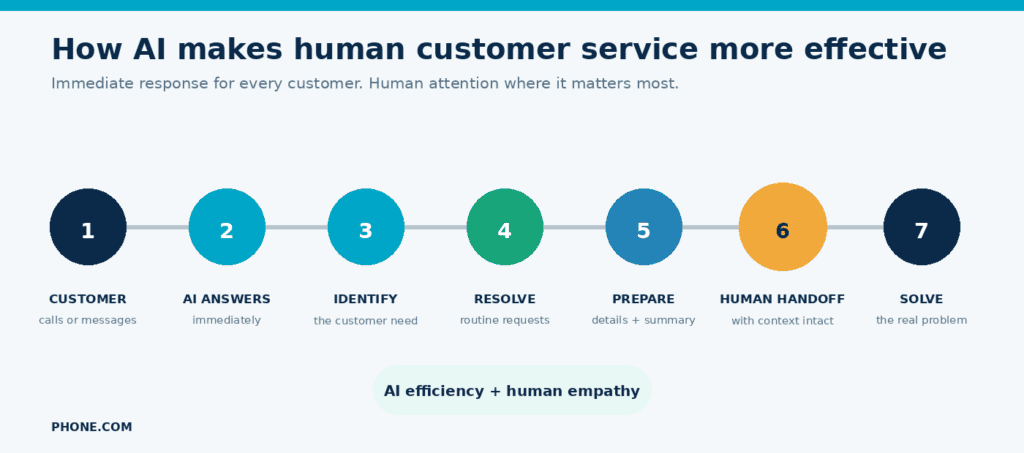
A typical interaction might look like this:
-
A customer calls the business.
-
AI answers immediately and asks how it can help.
-
The system identifies the reason for the call.
-
It completes a routine request when appropriate.
-
If a person is needed, it gathers relevant details.
-
It routes the conversation to the right employee with that context.
-
The employee focuses on solving the customer’s actual problem.
In this model, AI does not make human customer service less necessary. It makes it more effective. Customers receive immediate attention, and employees spend less time on administrative steps before getting to the work that matters.
Businesses can also combine AI with human-first options. A virtual phone assistant may cover routine inquiries, while a live answering service provides a real person when that experience is preferable. The right mix depends on the customer, the situation, and the business.
A Simple Framework: Automate, Assist, or Escalate
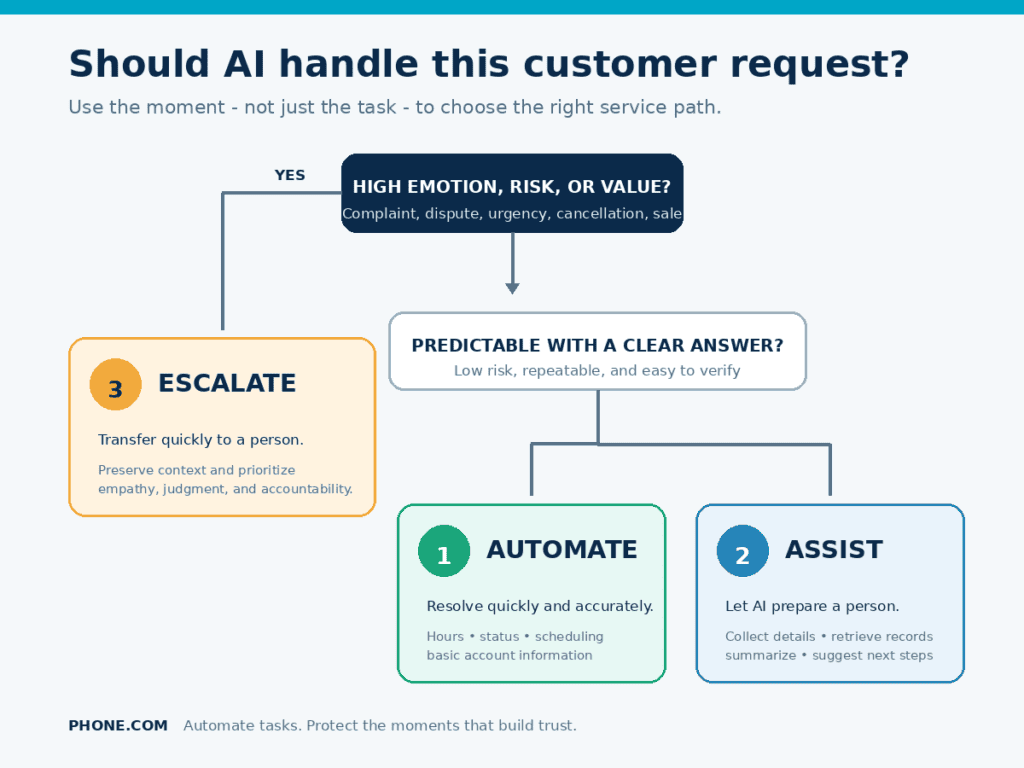
Before applying AI to a customer interaction, consider four factors: complexity, emotional stakes, business risk, and predictability. Those factors can place the interaction into one of three categories.
| Approach | Best for | Examples | Design requirement |
|---|---|---|---|
| Automate | Low-risk, predictable requests with a clear correct answer | Business hours, order status, appointment scheduling, basic account information | Make the answer fast and accurate |
| Assist | Requests in which AI can prepare or support a person | Collecting details, summarizing a conversation, retrieving records, suggesting next steps | Keep an employee responsible for the outcome |
| Escalate | High-emotion, high-value, sensitive, or unusual situations | Complaints, billing disputes, cancellations, complex troubleshooting, negotiations | Transfer quickly with full context |
The framework prevents a common mistake: deciding what to automate based only on whether the technology can perform the task. A better question is whether automation improves that particular customer moment.
For example, an AI assistant may be capable of responding to a cancellation request. But if the request follows a serious service failure, retaining the customer may depend on a person listening, apologizing, and proposing a tailored solution. The same task—cancellation—can require a different service path depending on its emotional and commercial context.
What AI Customer Service Means for Small Businesses
Large companies have traditionally had an advantage in customer service: bigger teams, longer coverage hours, and specialized departments. AI for small business can narrow that gap.
A small company may have only a few employees, with the owner handling sales, operations, customer questions, and countless other responsibilities. Calls arrive while the team is serving another customer. Messages come in after hours. Routine requests compete with work that directly grows the business. It is easy to understand why small business owners feel always on.
AI can help by supporting:
- Immediate call answering
- Virtual reception
- Business texting and follow-ups
- Automated appointment scheduling
- Call routing
- After-hours and overflow coverage
- Conversation summaries and message capture
These capabilities let a small business respond with the consistency customers often associate with a larger company. At the same time, the team can preserve the personal service that makes a small business distinctive.
That balance is the real promise of AI for business: not pretending a small team is enormous, but helping that team use its limited time where it creates the most value.
What This Looks Like for a Local Dental Practice
Consider a small dental office with one receptionist who checks in patients, manages the schedule, answers calls, and follows up on paperwork. During the morning rush, a new patient calls to ask whether the office accepts their insurance. At the same time, an existing patient calls about severe pain after a procedure.
Treating those calls identically would be efficient only on paper.
An AI phone assistant could answer both calls immediately. For the insurance question, it could provide approved plan information, collect the caller’s details, and offer an appointment. For the patient in pain, it should recognize urgent language, gather essential information, and route the call promptly to a qualified employee. The receptionist receives the context instead of starting from zero.
The practice gains coverage without making the patient feel dismissed. Routine demand is automated; urgent care is escalated; and the employee’s attention goes to the conversation with the greatest human and business consequences.
How to Use AI Without Losing the Human Touch
Customer service AI works best when the customer experience—not the technology—is the starting point. These practices can help:
1. Use AI for repetitive tasks
Start with frequent, predictable requests. Automating a well-understood task is more likely to improve the experience than asking AI to handle every possible situation at once.
2. Make human escalation easy
Give customers a clear route to a person. Escalation should not feel like a failure; it is a core part of a well-designed system.
3. Be transparent about AI use
Customers should understand when they are interacting with an automated assistant. Clear expectations build trust and reduce confusion.
4. Keep conversations natural
Use concise prompts, plain language, and questions customers can answer easily. Avoid forcing people through long menus or rigid scripts.
5. Personalize where it helps
Use known context to avoid unnecessary repetition and route requests intelligently. Personalization should make service easier, not intrusive.
6. Monitor customer feedback
Ask whether the interaction was helpful, and look for patterns in complaints, abandoned conversations, and repeat contacts.
7. Review failed interactions
Examine where the AI misunderstood customers, gave an incomplete answer, or failed to escalate. Those conversations show where the process needs improvement.
8. Give employees the context they need
When a conversation transfers, pass along the customer’s information and a useful summary. A smooth handoff is one of the clearest signs that AI and human support are working together.
How to Measure Whether AI Is Actually Improving Service
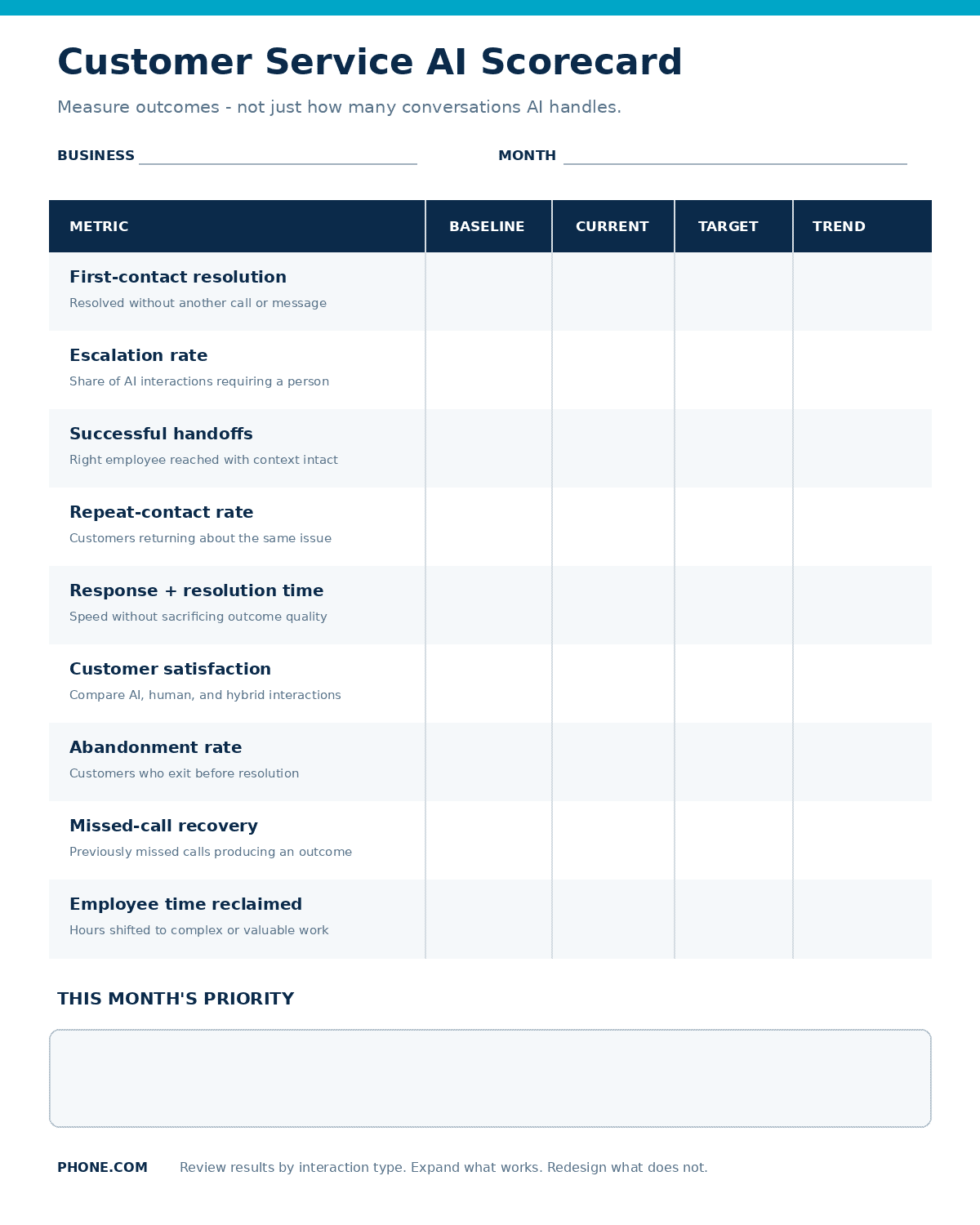
An AI implementation is not successful merely because it handles more conversations. A high automation rate can hide unresolved questions, repeat calls, or customers who gave up. Measure outcomes across efficiency, resolution, customer experience, and employee impact.
Useful metrics include:
- First-contact resolution: How often is the customer’s need fully resolved without another call or message?
- Escalation rate: What percentage of AI interactions require a person, and which topics cause the most escalations?
- Successful handoff rate: When escalation occurs, does the customer reach the right employee with the conversation context intact?
- Repeat-contact rate: Are customers returning about the same issue because the first answer was incomplete?
- Response and resolution time: Does AI reduce waiting without sacrificing the quality of the outcome?
- Customer satisfaction: How do customers rate automated, human, and hybrid interactions?
- Abandonment rate: Where do customers hang up, exit, or stop responding?
- Missed-call recovery: How many calls that once would have gone unanswered now produce a resolved request, appointment, or qualified follow-up?
- Employee time reclaimed: How much time shifts from repetitive administration to complex cases, sales opportunities, or relationship building?
Review these measures by interaction type rather than relying on one overall average. If appointment scheduling performs well but billing questions produce repeat contacts, expand the first workflow and redesign or remove the second. Good customer service automation should earn a broader role through results.
The goal is not to make every customer interaction automated. The goal is to make every customer interaction more effective.
Download the Customer Service AI Scorecard.
AI Won’t Replace Customer Service—It Will Help Reshape It
AI is changing customer service, but the future does not have to be one in which customers never speak with people. Businesses can use AI to remove repetitive work, improve response times, extend availability, and give employees more time for conversations that require a human touch.
For small businesses in particular, that creates an opportunity to provide faster, more consistent service without sacrificing personal connection.
AI won’t replace customer service. It will change where human attention creates the most value.
The companies that benefit most will not be those that automate the largest number of interactions. They will be the ones that recognize the difference between a task and a moment: automating predictable tasks, assisting employees with context, and protecting the moments when empathy, judgment, and accountability can earn a customer’s trust.