Stop handing out your personal number
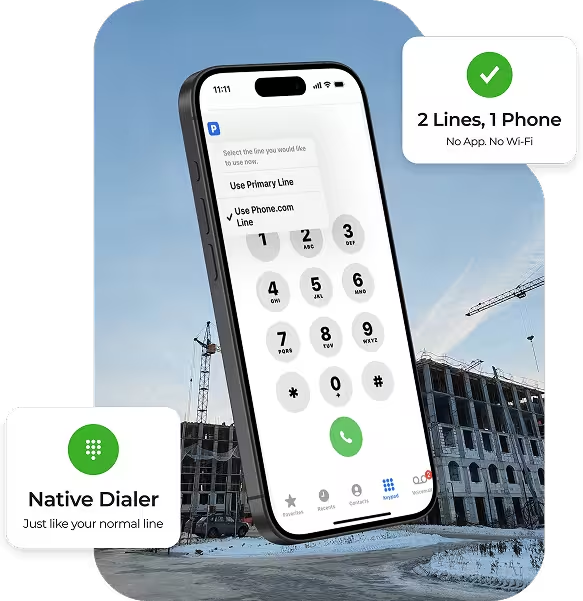
A dedicated business line on the phone you already carry. Native dialer. Real cellular network. No second device. No app to install. No Wi-Fi required.
- $10/mo · add-on to any plan
- Activate in minutes
- iPhone
- Android
ProSIM allows me to have a business phone number without having a separate physical phone or a clunky mobile app. It was very easy to get set up, and the customer rep was friendly, helpful, and patient.
Owner, SloTown BBQ
Your business line on your phone
If your work involves answering the phone — and the phone you carry is also the phone your family calls — you already know the problem. Mixed-up voicemails. After-hours interruptions. A personal number on every business card.
ProSIM gives you a second number that texts, calls, and dials over the cellular network you already trust, without a second device or a separate app to remember.
Built For:
2:10
A second number shouldn't mean a second phone
Every reason people tell us they've stayed on a single line — solved. No compromises that put your calls in a fair-toss queue.
ProSIM is an add-on to the device you already carry. There’s Nothing extra to buy, change, or keep track of.
Use the native dialer you already know. Your business line works exactly like your personal one does.
No Wi-Fi or data connection required. ProSIM uses the premier cellular voice network for optimum coverage.
Scan a QR code from your Phone.com account. There’s no hardware to install. You’ll be calling in minutes.
It seems normal to have totally separate systems for wireless and wired business communications, but the costs, complexity, and compromises are not normal. Businesses of all sizes will move toward SIM-based UCaaS as their providers enable it. ProSIM is ahead of the pack with a seamless approach to mobile business communications.
Founder, TalkingPointz · Independent UCaaS analyst
Ready to keep work where it belongs? Talk to a specialist
Join 50,000+ businesses. Pick your plan and get started in minutes with our 30-day money-back guarantee.
Frequently Asked Questions
Users on the move, such as landscapers, contractors, real estate agents, home health aids, tutors, insurance inspectors, and plumbers, benefit from knowing that their calls are handled on the highest quality, most reliable network wherever they are. Additionally, anyone who works in an environment without strong WiFi, including people in rural areas, can benefit.
There are two drawbacks to any VoIP app on a mobile device. First, you must open a unique app to make business calls. The second is that VoIP apps use network data or WiFi. The quality of these connections can vary. The mobile app is a satisfactory solution if you work in a space with a strong data or WiFi connection. However, if call quality is paramount and you are often away from WiFi, the PDC eSIM may be a better option. A ProSIM is also a good choice if device battery life is a significant concern.
A ProSIM adds just $10 monthly to your Phone.com service fees; the first month is free.
Yes. The Phone.com ProSIM is intended as a second line.
Yes if you are a Plus or Pro Phone.com user. Note that you will be subject to the same registration requirements and use restrictions as all business text messaging users. (Learn more)
First, you must signup for one our business phone systems plans. Once you do, you can add as many ProSIMs to your account as you like by accessing the Phone.com Store in My.Phone.com.
Once you add a ProSIM to your account and assign it to a user, you will receive an email with a link to install the ProSIM on your device. Android users will see a QR code you can scan to get started.
iPhone
Go to Settings > General > About and look for an IMEI number in the Digital SIM or ESIM section. If your phone supports eSIMs, it will show a 15-digit IMEI or IMEI2 number.
Android
Go to Settings > About > Status info (the steps may differ depending on your phone) and look for an EID or IMEI. If there is an IMEI number, the device is eSIM enabled.
We will also check your phone’s eSIM compatibility before you add Phone.com eSIM to your number.
Sometimes your phone may be “locked” to your current carrier. This may be the case if you are making payments on the device or if your phone is very new. To check if your phone is locked:
iPhone
Go into your iPhone’s Settings
Select “General”
Select “About”
Scroll down to “Carrier Lock” and see what it says
“No SIM restrictions” means your phone is unlocked, while “SIM locked” it is.
Android
Go into your Android phone’s Settings
Select “Connections” (or “Network and Connections”)
From here you can select “Network Operators” and see if multiple networks are available. This would mean your phone is likely unlocked. Otherwise, follow the next steps.
Scroll down and select “More connection settings”
Select “Network unlock” to view your “Network lock status”
This will tell you whether your phone is locked to a specific carrier or unlocked.
We will also check your phone’s locked status before you add Phone.com eSIM to your number.
In many cases, if your phone is locked, all you have to do is ask the mobile carrier to unlock it for you. However, some carriers will not unlock a phone that is newly enabled on the network or associated with an installment agreement.
One conversation. The right setup. Then you're back to work.
Join 50,000+ businesses. Pick your plan and get started in minutes with our 30-day money-back guarantee.