

A cloud phone system replaces copper-wire landlines with internet-based calling, giving small businesses lower costs, more features, and true mobility without the maintenance burden.
- Cost: Traditional systems carry heavy upfront hardware and line fees, while cloud options typically run on predictable per-user monthly pricing.
- Features: Modern cloud platforms bundle voicemail-to-email, video meetings, auto-attendants, and mobile apps that legacy landlines simply cannot offer.
- Mobility: Employees can make and take business calls from any device, anywhere, which matches how small teams actually work in 2026.
- Migration: Switching is faster and far less disruptive than most owners expect, especially with free number porting and month-to-month plans.
Recommendation: For nearly every growing small business, a cloud-based solution offers better value and flexibility than a traditional setup, and the switch is easier than sticking with aging copper infrastructure.
Choosing between a cloud phone system and a traditional phone system is one of the bigger communication decisions a small business owner will make. The right call affects monthly expenses, how customers reach you, and how easily your team can work from the office, the job site, or the road.
According to recent industry research, cloud phone systems run on an internet connection rather than copper telephone lines, with features managed through the vendor’s software and servers so small businesses only need a softphone app on a mobile or desktop device. Copper-wire landlines still exist, but they are quickly becoming the exception rather than the rule. This guide breaks down how the two systems compare, what each really costs, and how to migrate if you decide to make the switch. For a broader look at what a modern business communication platform offers, the fundamentals start here.
What Is a Cloud Phone System?
A cloud phone system is a business phone service that uses the internet to route calls instead of the traditional phone network. All the call handling, voicemail, routing, and features live in secure data centers run by your provider, not in a closet full of equipment in your office. You access the service through a web browser, a desktop app, a mobile app, or a compatible VoIP desk phone.
This approach is sometimes called a hosted phone system, a cloud PBX, or a VoIP business phone service, and the terms are largely interchangeable. What they share is a simple idea: the phone system is software delivered over the internet, which means upgrades, maintenance, and new features are handled by the provider rather than by you or your IT consultant. That shift removes a lot of the cost and complexity that kept small businesses tied to older systems for years.
How Traditional Phone Systems Work
Traditional phone systems use physical copper lines connected to an on-site Private Branch Exchange (PBX). Calls travel over the Public Switched Telephone Network (PSTN), the same infrastructure that has carried voice calls for more than a century. A business typically pays for each line, pays to install and maintain the PBX, and pays technicians whenever something needs to be changed, moved, or added.
This model is also on its way out. According to the FCC’s tech transition guidance, telephone and internet providers are retiring aging copper-line networks used to provide voice services in areas where modern fiber, satellite, and wireless services are available as a replacement Federal Communications Commission. The copper infrastructure small businesses have relied on for decades is being phased out in favor of IP-based alternatives. Traditional systems also tend to lack the modern features teams expect. Landlines typically provide basic voicemail, caller ID, and call waiting, while a modern VoIP business phone service bundles dozens of features into a single subscription.
Cloud vs Traditional: Key Differences for Small Businesses
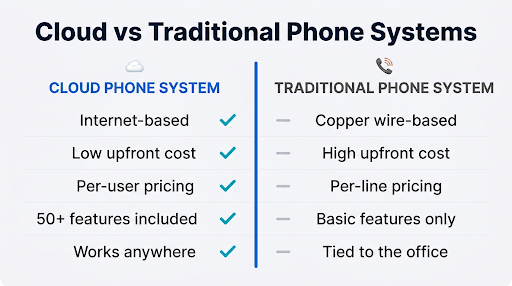
At a glance, both systems do the same basic job: they let you make and receive phone calls. Look closer, though, and the practical differences shape everything from your monthly bill to how quickly you can add a new team member. Here are the categories that matter most.
Cost and Predictability
Traditional phone systems usually involve meaningful upfront investment in hardware, wiring, and installation, plus recurring line fees and maintenance charges. Adding capacity means adding lines, which means more equipment and more bills. A cloud phone system replaces most of that with a simple per-user monthly fee. For a small team, that predictability alone often tips the decision.
Features Included Out of the Box
With a legacy setup, every extra feature tends to be another line item. Auto-attendants, call recording, voicemail transcription, and video conferencing are commonly add-ons or full third-party purchases. A modern hosted phone system typically bundles these features into the base plan. Teams get call routing, mobile apps, conference calling, and video meetings without separate contracts. Many cloud platforms also offer premium tools like an AI-powered answering service for screening calls and scheduling appointments, which would be essentially impossible to replicate with traditional hardware.
Scalability and Change Management
Growing businesses rarely grow in neat, predictable steps. A traditional system forces you to buy ahead of demand or scramble when demand arrives. Cloud systems scale with a few clicks: you add a user, assign a number, and that person is online within minutes. Shrinking is just as easy, which matters for seasonal businesses or teams that flex up for busy periods.
Mobility and Remote Work Support
The single biggest shift in small business communications over the last five years is where work actually happens. Data from Robert Half’s hybrid work research shows that 88% of U.S. employers provide some hybrid work options, and 24% of new job postings in Q4 2025 were hybrid while 11% were fully remote Robert Half. Traditional phones cannot follow workers off-site. Cloud platforms can, through softphone apps, mobile apps, and newer eSIM-enabled business phone services that turn a personal phone into a business extension without a separate device.
Reliability and Maintenance
Landline reliability is one genuine argument in favor of traditional systems, since copper lines can keep working during local power outages. Cloud systems depend on your internet connection. The tradeoff is that cloud providers run calls through multiple data centers with built-in redundancy, which means an issue at one location does not take your whole system down. Most reputable providers publish uptime statistics and include 24/7 support at no extra charge.
Pricing: What Does Each Option Actually Cost?
Pricing is usually the clearest reason small businesses start looking at a cloud phone system in the first place. Costs vary widely by provider and by how much hardware you already have, but the overall pattern is consistent. Here is a realistic look at what goes into each.
- Upfront hardware costs. Traditional systems often require thousands of dollars in PBX equipment, wiring, and desk phones before you can make a single call. Cloud systems usually require no special hardware at all, since the service runs on computers and smartphones you already own. Optional VoIP desk phones are available if your team prefers them.
- Per-line vs per-user pricing. Legacy systems charge per line, and more simultaneous calls mean more lines. Cloud providers charge per user, and most small business plans fall within a modest monthly range that includes unlimited domestic calling and a full feature set.
- Feature costs. Long-distance charges, voicemail services, call forwarding, and conferencing are often billed separately on traditional systems. Most cloud plans include these as standard, which makes budgeting easier.
- Maintenance and upgrades. Traditional systems require technician visits for most changes. Cloud providers handle all maintenance, software updates, and security patches as part of the monthly fee.
- Scaling costs. Adding a line to a traditional system can mean days of downtime and hundreds of dollars. Adding a user on a cloud system is typically a few clicks and a small monthly bump.
One caveat: cloud pricing is transparent, but it is still worth reading the plan details. Some providers reserve popular features for higher tiers, and international calling, SMS registration, or extra phone numbers may have modest add-on fees.
How to Migrate From a Traditional Phone System to a Cloud Phone System
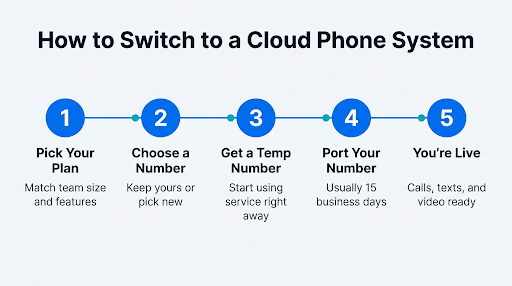
Migration is where many small business owners get stuck, usually because they imagine the switch will be disruptive. In practice, modern providers have made the process almost painless. A typical migration takes a few weeks, and your existing business number can usually come with you.
The process starts with picking a plan that matches your team size and feature needs. Next comes number selection, where you can either choose a new local business phone number or start the process of transferring your existing number. Most providers issue a temporary number so you can start using the service right away while the transfer is processed in the background.
From there, you configure call handling rules, add users, and either install the mobile and desktop apps or plug in compatible VoIP desk phones. Reputable providers offer 24/7 support during setup, and many will walk new customers through the full configuration on a live call.
A small but important detail: do not cancel your current service until your number has fully ported. Most porting requests complete within 15 business days, though timing depends on how quickly your old carrier releases the number.
When a Hosted Phone System Makes the Most Sense
A cloud phone system is a strong fit for most small businesses, but the value is especially clear in a few common situations. If your team works from multiple locations, travels, or supports remote and hybrid arrangements, a cloud platform lets everyone stay reachable on the same business number. If you serve customers in multiple markets, virtual numbers let you show a local presence without opening physical offices.
Service-based businesses often benefit the most from mobile-first options. Landscapers, contractors, real estate agents, home health aides, and field technicians spend most of their time away from a desk, and a mobile business extension lets them handle calls professionally without carrying a second phone. Some providers now support eSIM-enabled business phone services that route business calls through the cellular voice network, which offers better call quality than app-based VoIP in areas with weak Wi-Fi.
Healthcare practices, law firms, and other regulated industries have another reason to look at cloud systems: compliance. Many cloud providers offer HIPAA-compliant voice and video services, including signed Business Associate Agreements. Replicating that on a traditional system is possible but typically far more expensive and harder to maintain.
Frequently Asked Questions
Is a cloud phone system reliable enough for my small business?
Yes, for most small businesses. Reputable cloud providers run service through geographically distributed data centers with redundancy built in, which means a single point of failure will not take your phone system offline. The one real dependency is your internet connection. A modern broadband or fiber connection is typically more than sufficient, and many businesses keep a backup connection or a mobile hotspot for insurance.
Can I keep my current business phone number if I switch?
In nearly all cases, yes. Number porting is a standard, regulated process, and most cloud providers do not charge a fee to transfer a number in. You will need to keep your current service active until the port is complete, and you will need to provide accurate account information to avoid rejection from your current carrier. Wireless numbers require an account number and PIN from the existing provider.
Do I need new phones to use a cloud phone system?
Not usually. Cloud systems work on computers, smartphones, and tablets through provider apps, so most small businesses get started with zero new hardware. If your team prefers traditional desk phones, most providers support a wide range of compatible VoIP desk phones that you can buy separately or rent through the service.
How long does it take to set up an internet business phone system?
Initial setup often takes less than a day for a small team. Picking a plan, selecting or porting a number, adding users, and downloading apps is a process most owners finish in a single afternoon. Number porting runs in the background and typically completes within 15 business days without interrupting your service.
Is a VoIP business phone service secure?
Yes, when you choose a provider with modern security practices. Look for end-to-end encryption on voice and video calls, strong access controls, regular third-party audits, and compliance certifications like HIPAA or SOC 2 if they apply to your industry. Security is ultimately a shared responsibility: strong passwords, two-factor authentication, and careful user management matter on your end too.
The Bottom Line for Small Businesses
For most small businesses in 2026, a cloud phone system delivers better value, better features, and far more flexibility than a traditional phone system. The math tends to favor cloud almost every time once you factor in hardware savings, included features, and the ability to support hybrid and mobile teams without buying new equipment. Traditional systems still have a place in specific situations, but the combination of predictable pricing, modern features, and simpler scaling is hard to beat.
When you are ready to compare options, look for a provider that focuses on small businesses specifically, includes the features you actually use in the base plan, and offers real 24/7 support from humans. Phone.com has built its service around exactly that combination, with more than 50 standard features, free number porting, and no long-term contracts. You can explore plans and pricing to find the right fit and get up and running in the time it takes to brew a pot of coffee.