

A modern front desk for a small business is a connected system of people, processes and communication tools that answers inquiries, routes calls, schedules appointments and supports follow-up. It delivers the core functions of a traditional reception desk without requiring every call—or every employee—to be in one physical location.
For decades, the front desk was a physical place. It was where someone answered the phone, greeted visitors, scheduled appointments, took messages and connected customers with the right person.
That model still works for some businesses. But for many small companies, the work no longer happens in one location—and neither do the conversations that keep the business running. Owners may be meeting customers, employees may be working from home and technicians may spend most of the day in the field. A full-time receptionist may not be practical, but every caller still expects a prompt, professional response.
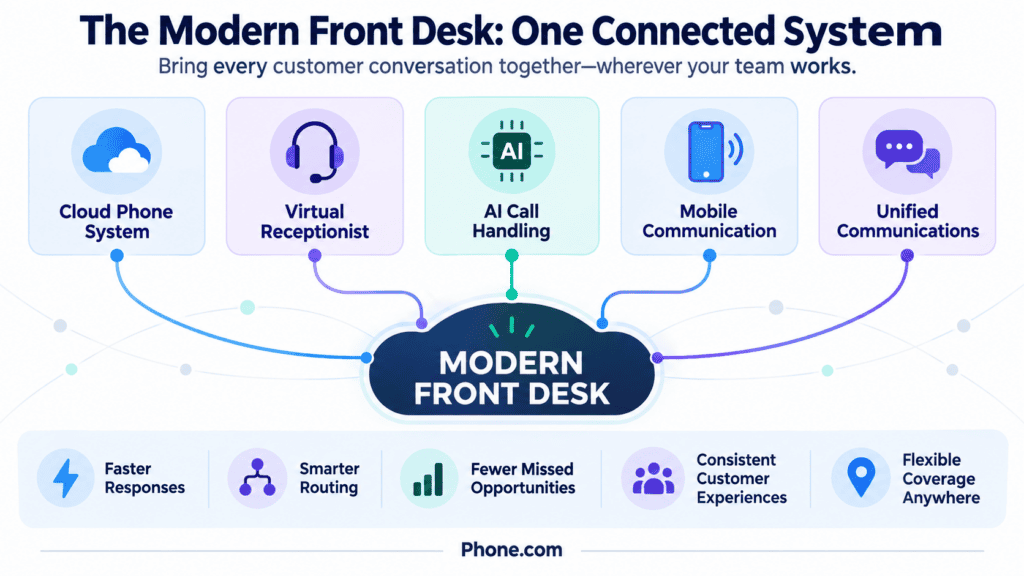
A modern front desk solves that problem. Instead of depending on one person sitting beside one phone, it combines a cloud phone system, intelligent call handling, mobile tools and shared communications. The result is a flexible system that helps a small team answer professionally, route calls efficiently and stay accessible from almost anywhere.
Key takeaways
- A modern front desk is a system, not necessarily a physical desk or a single employee.
- Cloud-based call handling helps small businesses remain responsive when employees work from different locations.
- Automated menus, live receptionists and AI receptionists serve different needs and can be used together.
- Mobile access allows employees to use their business identity without relying on personal phone numbers.
- The best setup is not the one with the most features. It is the one that creates a simple, reliable experience for callers and employees.
What does a traditional front desk do?
A receptionist usually performs several jobs at once. The role may include:
- Answering incoming calls
- Identifying what a caller needs
- Routing calls to the right employee or department
- Scheduling appointments
- Sharing basic information such as hours and location
- Taking messages when someone is unavailable
- Creating a welcoming and professional first impression
These functions are valuable. The limitation is that a traditional front desk is often tied to a person, a place and a set of business hours. If the receptionist is busy, away from the desk or already helping another caller, an important call may go unanswered. Small teams can also struggle to provide coverage during lunch, after hours, on weekends or when an employee is out.
The modern alternative is not simply an automated phone menu. It is a connected approach that assigns each front-desk function to the person or technology best equipped to handle it.
Why small businesses are moving beyond the physical front desk
Small-business communication has changed. A customer may call after discovering a company in a search result, send a text while comparing providers and expect a quick confirmation after scheduling an appointment. Meanwhile, the person best able to help may be at a job site, in a home office or traveling between locations.
Digital tools can help small businesses expand their customer base, manage growth and improve operations, according to resources highlighted by the U.S. Small Business Administration. For customer communication, that means building a front desk that can move with the business.
Customer expectations make consistency especially important. In a 2024 Salesforce survey of more than 15,000 consumers, 69% said they expect consistent interactions across departments, while 43% said a poor customer-service experience would prevent them from making another purchase. The same study found that nearly 60% preferred fewer touchpoints when seeking information or completing a task. In other words, callers do not simply want more communication options; they want a clear and efficient path to an answer.
A modern setup can help a small business:
- Extend coverage without staffing a physical desk every hour
- Give callers a consistent experience
- Reduce interruptions for owners and employees
- Route urgent and routine calls differently
- Keep business and personal communications separate
- Support remote, hybrid and field-based work
- Adapt more easily as the team grows
The goal is not to remove people from customer service. It is to use people where their judgment and expertise matter most while using technology to handle repetitive steps reliably.
What Phone.com has learned from serving more than 50,000 small businesses: An effective front desk is defined less by the number of features it offers than by how reliably it connects each caller with the right next step. Ease of use, mobile flexibility, onboarding and responsive support matter just as much as a long feature list.
The five components of a modern front desk
1. A cloud phone system
A cloud phone system provides the foundation. Unlike a phone line that is fixed to one desk, a cloud-based system can connect business numbers to desk phones, computers, mobile devices and employees in different locations.
Calls can follow rules based on the time of day, the number dialed or the caller’s menu selection. A business might ring several employees during business hours, send calls to an answering service in the evening and play an after-hours greeting overnight. Employees can make and receive business calls without giving customers their personal numbers.
This flexibility is especially useful for small companies because the system can change as the business changes. Adding a new employee, number, extension or call route does not require building a new reception area.
2. A virtual receptionist or auto attendant
An auto attendant greets callers and offers clear choices such as “Press 1 for sales” or “Press 2 for support.” It can also share routine information, direct callers to a directory or send calls to different destinations.
For a small business, the value is consistency. Every caller hears the same professional greeting and receives a path forward, even when the owner cannot answer personally.
Keep the menu simple. Too many options can make the business feel harder to reach. Most small businesses should prioritize the few reasons people actually call, provide a direct route to a person when appropriate and avoid sending callers through multiple menu layers.
A virtual receptionist can also refer to a live answering service. Trained receptionists can answer in the company’s name, take messages, qualify callers and transfer calls. Live coverage can be especially helpful when conversations require empathy, judgment or a distinctly human welcome.
3. AI call handling
An AI receptionist adds a more conversational option. Rather than asking callers to navigate a fixed menu, it can invite them to explain what they need in their own words. Based on the business’s instructions, it can answer common questions, route the call or help schedule an appointment.
This is useful for repetitive, high-volume interactions: confirming business hours, explaining where the company is located, identifying the service a caller needs or finding an available appointment. It can also provide coverage when employees are already on calls or the business is closed.
The setup matters. An AI receptionist should have an accurate knowledge base, clear routing instructions and a defined path for questions it cannot answer. Businesses should review its performance regularly and update information when hours, services or policies change.
AI call handling is not necessarily a replacement for employees or live receptionists. It can serve as the first point of contact and handle predictable requests, freeing the team to focus on conversations that need expertise or personal attention.
That combination reflects a broader customer preference: people value fast self-service but still want human assistance available for complex situations. Microsoft reports that customer-service teams are using automation to handle straightforward requests while preserving agent time for more meaningful interactions. In one Microsoft customer-service case study, call abandonment fell and average speed to answer dropped from six minutes to less than one minute after the organization introduced a connected, AI-supported service model. Although a large service operation differs from a small business, the underlying lesson is relevant: faster routing and useful self-service can reduce friction when there is a clear path to a person.
4. Mobile-first communication tools
A modern front desk must work wherever the team works. Mobile and web applications can let employees call, text, review voicemail and manage conversations using the company’s business number.
That means a contractor can return a customer’s call between appointments, a real estate agent can respond while away from the office and an owner can check a voicemail transcription without stopping to listen to the full recording. Customers see a consistent business identity, while employees avoid publishing their personal numbers.
Mobile access should not mean that every employee is available all the time. Schedules, forwarding rules, queues and do-not-disturb settings can establish boundaries while ensuring that callers still reach an appropriate destination.
5. Unified business communications
Phone calls are only one part of the customer experience. Text messages, voicemail, video meetings and contact records may all contribute to the same relationship. When those channels are disconnected, follow-up depends too heavily on memory and individual inboxes.
A unified approach makes communication easier to track and act on. Voicemail transcription can help an employee scan a message quickly. Shared call logs can show when a customer called. Business texting can provide a convenient way to send an update or confirmation. Integrations can connect communication activity with other business systems.
The purpose is not to add channels simply because they are available. It is to give customers appropriate ways to connect and give the team enough shared visibility to respond consistently.
Which front-desk option is right for your business?
These options are not mutually exclusive. Many small businesses use an auto attendant for basic routing, an AI receptionist for routine conversations and a person for calls that require judgment.
| Option | Availability | How callers interact | Best suited for | Important limitation |
|---|---|---|---|---|
| Traditional receptionist | Scheduled working hours | Natural conversation | In-person welcome and complex calls | Coverage depends on staffing |
| Auto attendant | 24/7 | Fixed menu choices | Simple, predictable routing | Menus can frustrate callers if they are too long |
| Live virtual receptionist | Based on service plan | Natural conversation with a person | Lead qualification, message taking and high-touch service | Cost generally increases with usage or coverage |
| AI receptionist | 24/7 | Callers explain what they need conversationally | FAQs, appointment scheduling and intelligent routing | Requires accurate business information and escalatio |
The best choice depends on call volume, customer needs, budget and the complexity of the conversations. A microbusiness may begin with automated routing and mobile apps, then add live or AI reception as call volume grows.
What a modern front desk looks like in practice
The right setup depends on how a business operates. Here are three examples.
Home services company
A plumbing company’s technicians spend most of the day on job sites. Incoming calls first reach an AI receptionist that identifies whether the caller needs emergency service, a routine appointment or general information. Emergency calls route to the on-call employee. Routine callers can request an appointment, while common questions about service areas and hours receive an immediate answer.
The technicians use their mobile devices to call customers from the business number, and the owner can review call activity without being tied to an office.
Small law firm
A law firm needs a professional first impression but does not want attorneys interrupted by every incoming call. A brief greeting directs existing clients and prospective clients appropriately. A live receptionist collects basic information from new callers and transfers urgent matters according to the firm’s rules. When staff members are unavailable, voicemail transcription helps them prioritize follow-up.
This arrangement protects focused work while still giving callers a clear, human path to help.
Healthcare practice
A small healthcare practice receives calls about appointments, office hours, directions and administrative questions. A modern front desk can answer general questions and help route callers without requiring one employee to repeat the same information throughout the day. Scheduling tools can reduce back-and-forth, while call queues help manage busy periods.
Healthcare organizations should choose communications services designed to support their privacy and compliance requirements, configure them carefully and maintain appropriate policies for protected information.
How to design the right front desk for your business
Start with the caller’s experience, not a list of features. Map the most common reasons people contact your company and decide what should happen in each situation.
Ask these questions:
-
Why do customers call? Identify the five or six most common needs.
-
Which calls require a person? Separate routine requests from conversations requiring empathy, expertise or judgment.
-
Who should receive each type of call? Define a primary destination and a backup.
-
What should happen after hours? Decide which needs can wait and which require immediate escalation.
-
What information can be provided automatically? Keep hours, locations, service details and policies accurate.
-
Which devices and channels does the team use? Consider desk phones, computers, mobile phones, voice, text and video.
-
How will you know the system is working? Review missed calls, abandoned calls, voicemail volume, response time and appointment outcomes.
Test the experience by calling the business yourself. Can a first-time caller understand the options? Does the call reach the right place? Is there a useful next step when no one answers? A short, clear call flow will usually outperform an elaborate one.
Build a front desk that fits the way your business works
A modern front desk does not need a marble counter, a waiting room or even a permanent office. It needs a reliable system for welcoming customers, understanding what they need and helping them reach the right next step.
For some businesses, that means a simple cloud phone system with a professional greeting and mobile apps. Others may benefit from a live receptionist, AI call handling or a combination of automated and human support. The best approach is flexible enough to serve customers today and adapt as the business grows.
Phone.com brings business calling, texting, video, mobile access and advanced call handling together in a platform designed for small businesses. Businesses that need round-the-clock conversational answering can also use AI-Connect to answer common questions, route callers and schedule appointments using Google or Outlook calendars. Explore Phone.com’s business phone features to build a front desk that keeps your business accessible and professional—wherever your team happens to be.
Frequently asked questions
What is a modern front desk for a small business?
A modern front desk is a combination of people, processes and cloud-based communication tools that answers inquiries, routes calls, shares information, schedules appointments and supports follow-up. It can operate without a traditional reception desk or a full-time, on-site receptionist.
What is the difference between an auto attendant and an AI receptionist?
An auto attendant generally asks callers to choose from a fixed menu using their keypad or voice. An AI receptionist can interpret a caller’s spoken request and respond more conversationally, based on the information and instructions provided by the business.
Can a small business use both a live receptionist and automation?
Yes. Automation can handle greetings, routine questions and initial routing, while a live receptionist or employee handles calls that require judgment or a personal conversation. Calls can also follow different paths based on the time of day or reason for calling.
Does a cloud phone system require desk phones?
Not necessarily. Many cloud phone systems work with mobile applications, web applications, computers and compatible desk phones. A business can choose the combination that fits how its employees work.
How can a modern front desk improve customer experience?
It can make the business easier to reach, give callers clearer next steps, reduce transfers and help the team respond more consistently. Its effectiveness depends on simple call flows, accurate information and reliable escalation to a person when needed.