
 Customers rarely know how many people work behind the scenes at a business. They know whether the website looks trustworthy, whether someone answers the phone, whether the information they receive is consistent, and whether the business follows through.
Appearing larger than your business means creating a consistent, responsive, and professional customer experience—not misrepresenting the size of your team.
That gives a small business an important opportunity. You do not need a large staff, multiple departments, or an expensive office to create the kind of customer experience people associate with an established company. You need clear communication, reliable systems, and a consistent way of serving customers.
Appearing larger is not about misleading anyone. It is about removing the friction and inconsistencies that can make a capable small business seem less professional than it really is. With the right small business technology, even a solo owner or lean team can be accessible, responsive, and organized—while preserving the personal service that makes customers choose a smaller company in the first place.
Key Takeaways
- Customers judge professionalism through their experience, not the size of your staff.
- A consistent website, business email address, phone presence, and online listings build trust before the first conversation.
- Fast, dependable responses can make a small team feel capable and well organized.
- A business phone system, virtual receptionist, and communication automation can extend coverage without requiring a large staff.
- Technology should handle routine work while making it easier for your team to deliver personal service.
The Professional Presence Formula
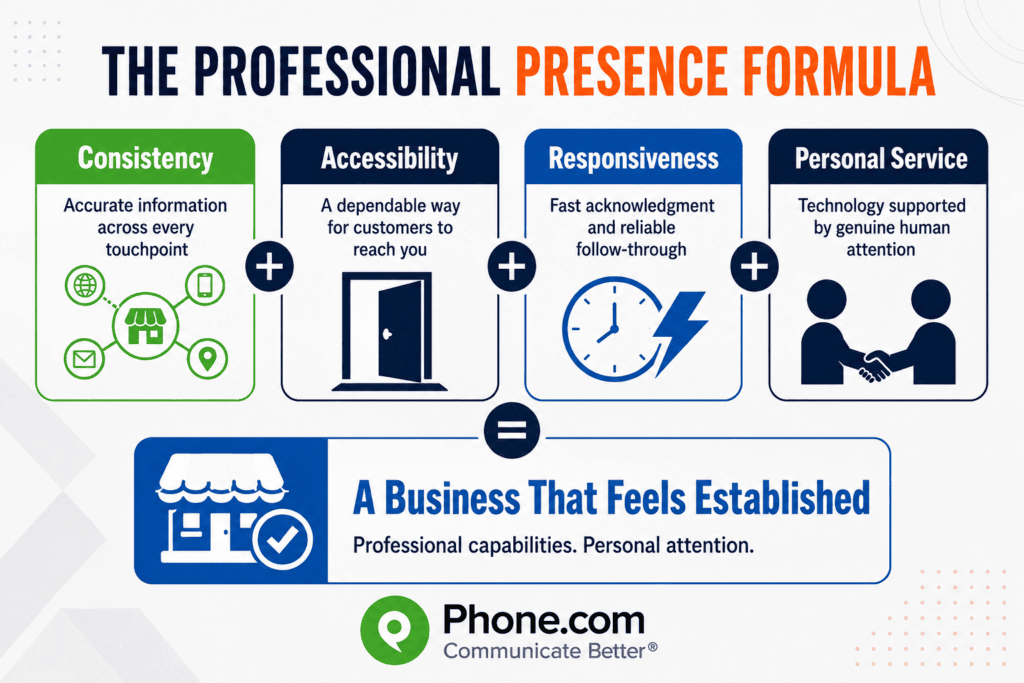
A business does not feel established because it has a certain number of employees. It feels established when four elements work together:
The Phone.com Professional Presence Formula: Consistency + Accessibility + Responsiveness + Personal Service
- Consistency means customers see accurate information and receive a unified experience across your website, phone, email, text messages, and business listings.
- Accessibility means customers have a dependable way to reach your business and take the next step.
- Responsiveness means inquiries are acknowledged quickly and followed through as promised.
- Personal service means technology supports—not replaces—the human attention that differentiates a small business.
If one element is missing, the customer experience can feel less reliable. Together, they allow a solo owner or small team to deliver the confidence associated with a much larger organization.
Customers Don’t Know How Big Your Team Is
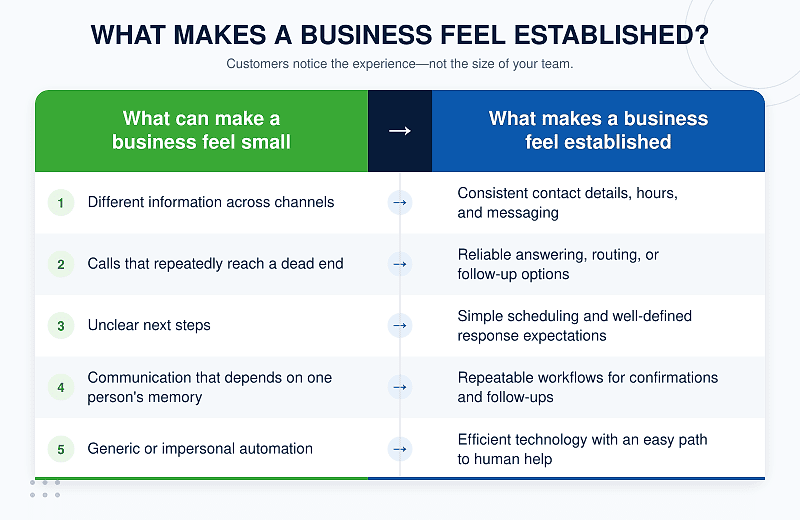
Most customers encounter only a small part of your organization. They may find you through a search, visit your website, send a text, or call your main number. From those few interactions, they quickly decide whether your business seems credible and ready to help.
Company size and perceived professionalism are not the same thing. A large company can create a poor impression with confusing processes and slow service. A one-person company can inspire confidence with a polished website, a prompt response, and a clear next step.
Consistency matters because customer expectations have been shaped by their best experiences with businesses of every size. In Salesforce’s survey of more than 15,000 consumers, 69% said they expect consistent interactions across departments, and nearly 60% preferred using fewer touchpoints to get information or complete a task. A small business may not have departments, but customers still notice when they have to repeat themselves or receive conflicting answers from one channel to another.
Small companies also have an advantage: proximity. Owners and team members often know their customers, understand the local market, and can make decisions quickly. The goal is to pair that personal attention with systems that make every interaction feel dependable.
Create a Professional First Impression
A customer’s impression begins before anyone says hello. Your website, email address, social profiles, reviews, and business listings all communicate whether your company is active, organized, and trustworthy.
Learn how better communication, consistent branding, and smart technology can help your small business look professional without losing its personal touch.Start by reviewing the basics:
- Use an email address tied to your business domain instead of a personal account.
- Choose a professional business phone number and display it consistently.
- Record a clear voicemail greeting that identifies the business and tells callers what will happen next.
- Use the same logo, colors, tone, and core message across your website and social profiles.
- Keep your hours, address, phone number, and service information accurate everywhere customers may find you.
These details may seem small, but together they signal small business professionalism. BrightLocal found that 62% of consumers would avoid a business if they found incorrect information online. The same study found that 45% would lose trust after encountering an incorrect phone number.
Customers do not expect every local contractor, consultant, retailer, or healthcare practice to have a corporate headquarters. They do expect accurate information and a clear path to assistance. When every public touchpoint tells the same story, your business feels established because it feels under control.
Make Your Small Business Easy to Reach
Accessibility is one of the strongest signals of professionalism. A company that answers consistently, routes inquiries correctly, and responds promptly feels equipped to serve its customers—even when the actual team is small.
A modern business phone service can give a small team capabilities that once required an office switchboard or dedicated receptionist. Depending on your needs, those capabilities can include:
- A main business number that keeps personal numbers private
- Call routing to the right person, device, or location
- Business texting from the same professional number
- Custom greetings and menus
- Call forwarding for mobile or remote teams
- Voicemail transcription
- Appointment scheduling
- After-hours coverage
The key is to design communication around the customer’s need, not your internal limitations. A caller does not need to know that the owner is at a job site or that the office manager is helping another customer. The caller needs confirmation that the business received the inquiry and a clear idea of what happens next.
Automated responses can acknowledge a text or web inquiry immediately. Call routing can connect customers with an available team member. A virtual phone assistant can answer common questions or gather information before passing the conversation along. Used thoughtfully, these tools make communication feel effortless rather than impersonal.
Stop Letting Missed Calls Make You Look Small
Being small is not the problem. Being difficult to reach is.
When a prospective customer repeatedly reaches voicemail, they have to interpret the silence. They may assume the business is too busy, disorganized, unavailable, or no longer operating. More often, they simply call someone else.
That risk is not theoretical. Invoca’s 2026 analysis of more than 70 million calls found that only 56% of callers to businesses spoke with a person. Among answered calls, 38% were leads, and 42% of those leads converted during the call. For a small business paying to generate demand, answering more of the calls already coming in may be one of the most direct ways to protect its marketing investment.
No single answer strategy works for every business, but customers should always have a useful path forward. That might include:
- Forwarding calls to another team member when the primary contact is unavailable
- Using a live answering service during busy periods
- Adding a virtual receptionist to collect the caller’s name, reason for calling, and preferred follow-up time
- Using an AI phone assistant to answer frequently asked questions, route calls, or schedule appointments
- Sending missed-call text messages that confirm the inquiry was received
- Setting clear expectations in voicemail greetings and returning calls within a defined time
The aim is not necessarily to answer every question instantly. It is to prevent the customer from reaching a dead end.
How This Works for a One-Person Business
Consider a solo HVAC contractor who spends most of the day on service calls. Without a communication system, a prospective customer may call during a repair, reach a personal voicemail greeting, and move on to another provider.
With a professional business number and a few simple workflows, the same contractor can create a very different experience. A virtual receptionist can answer in the company name, ask what the customer needs, collect essential details, and schedule an estimate or flag an urgent request. The contractor can receive the information by text, return the call between appointments, and continue the conversation personally.
The business has not pretended to employ a large office staff. It has simply made it easier for customers to get a prompt, organized response. Technology handles the interruption; the owner still delivers the expertise and personal service.
Build Systems That Give You Big-Business Capabilities
Large organizations divide work among departments. A small business owner may handle sales, scheduling, service, billing, and customer support before lunch. Trying to manage every task manually creates delays—and makes the customer experience depend too heavily on one person’s memory and availability.
Simple systems can recreate the useful infrastructure of a larger operation:
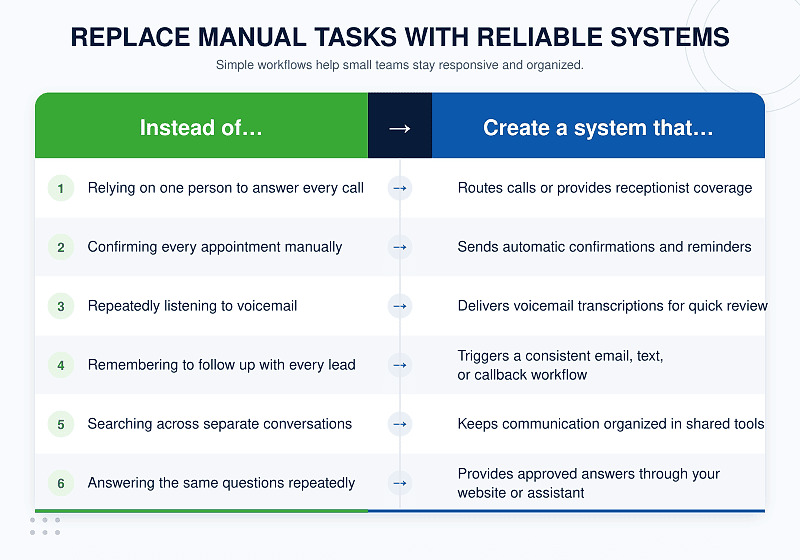
The best systems do not add unnecessary steps. They reduce the number of things your team must remember and make the next action obvious for the customer.
Start with the friction customers experience most often. If calls are going unanswered, improve coverage and routing. If appointments are missed, automate reminders. If customers keep asking about hours or service areas, update your website, business listings, and phone experience. Solve one recurring problem at a time, then measure the result.
Look Professional Without Losing Your Personality
Trying to appear more established can backfire if the business begins to sound distant or overly corporate. Small businesses often win because customers can speak with someone who knows the work, understands the community, and cares about the outcome.
Technology should protect that advantage—not replace it.
Use automation for predictable, repetitive tasks such as acknowledging inquiries, confirming appointments, routing calls, and sharing basic information. Preserve the human element where judgment, reassurance, or relationship-building matters. A roofing customer may appreciate an immediate text confirming an inspection request, but still want a knowledgeable person to discuss the condition of the roof. A client may like booking an appointment without waiting on hold, then value a warm, personal conversation during the appointment itself.
Transparency is especially important when AI is involved. Salesforce reported that nearly three-quarters of consumers want to know when they are communicating with an AI agent, while 45% are more likely to use one when there is a clear path to a person. Let customers know what the assistant is, give it accurate information, and make escalation easy.
You can also preserve your personality by:
- Writing greetings and messages in your natural brand voice
- Using customer names and relevant context when following up
- Featuring real team members and local expertise on your website
- Giving employees enough flexibility to solve problems instead of forcing every interaction into a script
- Asking customers how they prefer to communicate
Professional does not have to mean generic. The ideal customer experience combines the confidence of a well-run company with the warmth of a business that knows its customers.
7 Ways to Appear Larger Than Your Business
1. Use a professional business phone number
Separate business and personal communication while giving customers one dependable number to call or text. A local, toll-free, or memorable number can also strengthen your professional identity.
2. Answer calls consistently
Create a coverage plan for busy periods, after-hours inquiries, and employee absences. Use forwarding, routing, a receptionist service, or an automated assistant so callers do not encounter a dead end.
3. Create a polished voicemail experience
Identify the business, keep the greeting concise, and explain when the caller can expect a response. Review the greeting whenever your hours or availability change.
4. Offer business texting
Texting can make it easier to confirm appointments, share updates, and respond to customers who cannot stay on a call. Keep messages professional and use a business number rather than a personal mobile line.
5. Make scheduling easy
Offer a clear way to request or book an appointment, send confirmations, and provide reminders. Remove unnecessary back-and-forth while giving customers access to a person when special help is needed.
6. Automate repetitive communication
Use templates and workflows for inquiry acknowledgments, appointment reminders, common questions, and follow-ups. Review automated messages regularly so they remain accurate and sound like your business.
7. Keep branding and information consistent everywhere
Audit your website, email signatures, social profiles, online directories, proposals, and invoices. Use the same company name, contact details, visual identity, and essential message across every channel.
The Small Business Advantage
Small businesses are not a minor part of the economy. The U.S. Small Business Administration’s 2025 profile counted 36.2 million small businesses, representing 99.9% of U.S. businesses. Customers are accustomed to buying from small organizations; size itself is rarely the barrier.
The real question is whether a business makes the customer feel confident. Can they find accurate information? Can they reach someone? Does the company respond when promised? Is it easy to take the next step?
A small team can answer those questions just as well as a much larger one. In some cases, it can answer them better. Small businesses can adopt modern communication infrastructure without adding layers of bureaucracy. They can automate routine work, make decisions quickly, and still provide direct access to people who care about the relationship.
That combination is difficult for larger companies to reproduce: the operational capabilities customers expect, delivered with the personal attention they value.
Frequently Asked Questions
How can a small business look more professional?
Create a consistent experience across your website, business email, phone number, greetings, online listings, and follow-up messages. Make your contact information accurate, explain the next step clearly, and respond when you say you will. Customers are more likely to judge these signals than the number of people on your payroll.
How can a one-person business appear more established?
Use systems that keep the customer experience reliable when you are unavailable. A professional business number, call routing, virtual receptionist, shared scheduling tool, automated confirmations, and prompt follow-up workflows can provide structure without suggesting that your company is larger than it is.
Does a business phone number make a company look more professional?
Yes. A dedicated business phone number separates personal and business communication, gives customers a consistent way to call or text, and supports professional greetings, routing, voicemail, and other business features. It can also help protect the owner’s personal number.
How can a small business answer calls without hiring a receptionist?
Calls can be forwarded to available team members or handled by a live answering service, virtual receptionist, or AI phone assistant. The right choice depends on the complexity of the calls, desired hours of coverage, budget, and how often a caller needs to speak directly with a person.
Can a small business look bigger without misleading customers?
Absolutely. The goal is not to invent employees or conceal the size of the company. It is to remove avoidable friction through accurate information, dependable communication, clear processes, and professional tools. A small business can be transparent about its size while delivering an experience that feels capable and well organized.
Create a Bigger Impression With the Team You Already Have
Appearing larger than your business is not about inventing employees, hiding your size, or adopting a corporate personality that does not fit. It is about presenting the capable business you already run in a consistent, professional way.
Begin with the moments that shape customer confidence: the search result, the website visit, the first call, the appointment confirmation, and the follow-up. Then put systems behind those moments so the quality of the experience does not depend on whether one busy person happens to be available.
You do not need a bigger team to create a bigger impression. You need the right systems behind the team you already have.
Phone.com gives small businesses professional calling, texting, routing, and reception tools designed to help them stay responsive from almost anywhere. Explore Phone.com business phone service and build a communication experience that feels polished without losing the personal touch.