
Remote work can give a small business access to more talent, lower overhead, and the freedom to serve customers beyond a single market. But growth becomes difficult when calls, messages, and customer information are scattered across personal phones and disconnected apps.
That is where cloud communications make a practical difference. A connected set of internet-based calling, texting, video, routing, and automation tools can give a remote business the communication foundation of an established company—without requiring a traditional office or an equipment room.
The goal is not simply to add more technology. It is to help employees work from virtually anywhere while giving every customer a consistent, professional experience.
Key Takeaways
- Remote businesses need a central communication system, not just email and team chat.
- Cloud communications keep business calls and messages separate from employees’ personal contact information.
- Call routing, shared numbers, business texting, video meetings, and automation help distributed teams deliver a consistent customer experience.
- A cloud phone system can make it easier to add employees, numbers, departments, schedules, and markets as the business grows.
- The best communication stack supports human connection and clear ownership rather than adding more disconnected tools.
Remote Businesses Need More Than a Chat App
 Team chat and email are useful for internal collaboration, but they do not provide a complete communication system. Customers still call. They send text messages. They expect quick answers, smooth handoffs, and a consistent experience regardless of which employee responds.
Those expectations do not disappear because a team works remotely. In fact, the need for deliberate coordination often increases when employees cannot turn to the person at the next desk.
Distributed work is no longer an edge case. Gallup reported in 2025 that remote-capable workers make up about half of the U.S. workforce and that hybrid work patterns have remained relatively stable since 2022. Even among remote-capable employees working fully on-site, 27% said their teams were spread across different locations—more than double the 13% reported in 2023.
The operational lesson is simple: being in an office does not guarantee that everyone a business depends on is in the same place. Communication systems must work across locations by design.
Without a central platform, a remote team can easily develop communication silos. One employee may take calls on a personal phone, another may manage customer texts, and a third may have the latest voicemail or appointment information. Customers may need to repeat themselves, while managers have little visibility into what happened.
A complete remote business communication system brings those interactions together. It gives the business shared numbers, routing rules, voicemail, texting, and other tools that belong to the company rather than to any one employee or location.
What Are Cloud Communications?
Cloud communications move many functions once handled by office-based phone hardware into internet-based services. Employees can access those services through desk phones, computers, mobile apps, or other connected devices.
Cloud communication solutions can include:
- A cloud phone system for business calls, extensions, and voicemail
- Virtual phone numbers that are not tied to one physical line
- Call routing and forwarding
- Business texting
- Video meetings
- Virtual or AI-assisted reception
- Automated responses and appointment scheduling
- Integrations with calendars, customer relationship management platforms, and other business tools
A remote business therefore does not need a traditional office phone system to sound professional. It can present one recognizable business identity while employees work from home offices, coworking spaces, job sites, or different states.
How Cloud Communications Keep Remote Teams Connected
Growth usually adds communication complexity. A founder who once answered every call may hire a salesperson, a service coordinator, and a support specialist. Soon, no single person has the full context behind every conversation.
A centralized virtual phone system helps the business grow beyond that founder-led model. Calls to the main number can follow rules based on department, availability, schedule, or caller selection. Employees can call and text using business numbers without exposing their personal numbers. Shared voicemail and communication histories can make handoffs easier.
The system also lets people work across devices. An employee may take a call through a desktop app at home, respond to a business text from a mobile device while away, and join a video meeting with a customer later that day—all while representing the same business.
Technology alone will not eliminate coordination problems, however. McKinsey’s research into highly distributed organizations emphasizes clear working practices, transparent information, trust, and intentional operating norms. A centralized communication platform supports those practices, but leaders still need to define who owns each channel, how quickly the team should respond, and when a conversation should be escalated.
Build a Professional Customer Experience From Anywhere
Customers should not have to know whether the person helping them is working from a headquarters, a kitchen table, or another time zone. They should simply be able to reach the business and get a useful response.
Cloud communications can create that consistency in several ways:
- Professional business numbers give customers a stable point of contact as the team changes or expands.
- Call routing directs callers to the right person or group instead of depending on one employee to answer everything.
- Virtual reception can greet callers, collect information, answer common questions, or route calls when employees are occupied.
- Business texting gives customers a convenient way to confirm appointments, request updates, or continue a conversation.
- Shared voicemail prevents important messages from being trapped on an individual employee’s device.
- Automated responses and scheduling provide timely assistance outside normal hours while setting clear expectations for human follow-up.
Consistency matters to customers. In Salesforce’s survey of more than 15,000 consumers, 69% said they expect consistent interactions across departments, while 43% said a poor customer service experience would stop them from buying from a company or brand again.
For a growing remote business, that creates both a risk and an opportunity. A fragmented system can make a small team feel disorganized. A well-designed one can make the same team feel responsive, capable, and easy to work with.
Your team can be distributed without your customer experience feeling disconnected.
Cloud Communications Make Scaling Easier
 Traditional phone infrastructure was designed around a place: a building, a wiring closet, and a fixed set of extensions. A remote business grows differently. It may add an employee in another state, launch a specialized team, enter a new market, or change schedules without opening another office.
Cloud communications give the business more flexibility to adapt. Depending on the provider and plan, an administrator may be able to add users, extensions, phone numbers, devices, and routing rules without installing a new phone system at every location.
That flexibility supports several common stages of growth:
Adding employees
New team members can be assigned business numbers, extensions, and permissions without inheriting a former employee’s personal communication setup.
Creating departments
Calls can be separated into sales, service, billing, or other groups. This establishes clearer ownership and reduces the chance that requests will be lost in a general inbox.
Entering new markets
Additional business numbers can give customers a familiar way to reach the company while calls continue to flow to the distributed team.
Extending coverage
Routing and scheduling rules can distribute calls across employees with different working hours or time zones. Automation can handle routine requests or explain when a person will respond.
Improving resilience
Because the business number is not dependent on one desk or office, communication can continue when an employee changes location or a physical workspace is unavailable.
The strategic value is not merely that a cloud phone system can expand. It is that the communication model can change without forcing the business to rebuild its infrastructure every time it grows.
Supporting Employees Across Locations and Time Zones
Geographic flexibility creates a scheduling challenge: the business may serve customers when a particular employee is unavailable. If the company relies on personal phones and informal handoffs, coverage becomes inconsistent.
A better approach is to design availability into the communication system. For example, a business could:
- Ring a group of employees during core hours
- Route calls to the next available team member
- Forward urgent calls to an on-call employee
- Send unanswered calls to a shared voicemail box
- Use an automated greeting to explain after-hours options
- Let customers send a business text for a quick update
- Offer appointment scheduling when an immediate conversation is not necessary
These workflows help distribute responsibility without asking every employee to be constantly available. That matters because more channels do not automatically create more capacity. Microsoft’s 2025 Work Trend Index, based partly on Microsoft 365 productivity signals and a survey of 31,000 workers in 31 countries, found that employees were interrupted by a meeting, email, or chat an average of 275 times per day.
The lesson for small businesses is not to automate everything. It is to route each type of communication to the right channel and person, reduce unnecessary interruptions, and make ownership unmistakable.
The Cloud Communication Stack for a Growing Remote Business
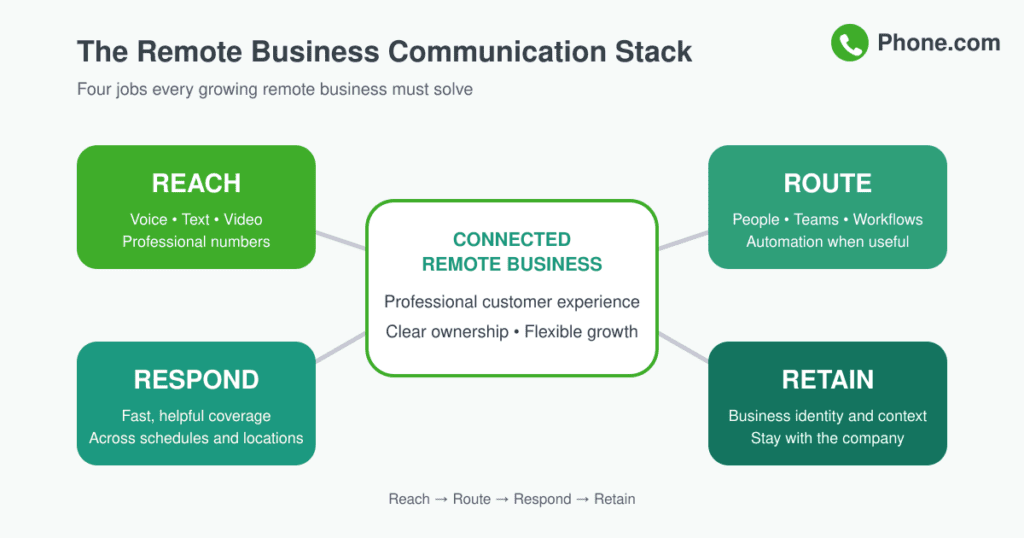
There is no single ideal technology stack for every company. A two-person consulting firm and a distributed service business with 30 employees will have different needs. Most growing remote businesses, however, should evaluate six core capabilities.
1. Cloud business phone system
Start with reliable calling, business numbers, extensions, voicemail, and routing. A business phone service should let employees communicate professionally from the devices and locations that fit their work.
2. Business texting
Texting is useful for appointment reminders, status updates, quick questions, and other short customer interactions. Keep these conversations connected to the business rather than scattered across employees’ personal numbers.
3. Video meetings
Video gives remote teams and customers a richer option when a phone call or message is not enough. Look for video meetings that are easy for guests to join and practical for everyday collaboration.
4. Virtual reception
A virtual phone assistant can help cover calls when employees are busy, collect the reason for a call, and direct the caller to the appropriate next step.
5. AI communication tools
An AI phone assistant may be useful for repetitive questions, intelligent call routing, and appointment scheduling. Use AI where it makes service faster or more available, and give customers a clear path to a person when human judgment is needed.
6. Integrations
Connections to calendars, contact records, scheduling tools, and other business systems can reduce duplicate data entry. Prioritize integrations that remove a specific point of friction rather than adding tools simply because they are available.
When comparing cloud communication solutions, ask:
- Can employees use the system securely from the devices and locations they need?
- Can we keep business and personal communication separate?
- Can calls and messages be routed based on roles, schedules, or availability?
- Can we add users and numbers without replacing the system?
- Can administrators manage settings without specialized technical support?
- Does the provider offer the reliability, support, security, and compliance our business requires?
- Will the system connect with the tools we already use?
- Can customers reach a person easily when automation is not enough?
Don’t Let Remote Work Make Your Business Feel Distant
Remote work should change where communication happens—not weaken the relationship behind it.
The wrong technology stack creates more inboxes, more notifications, and less clarity. The right one gives every conversation a clear destination and owner. It helps a customer reach the business quickly, gives an employee the context to respond, and makes it easier for the next person to continue the interaction.
That means automation should support the team, not create distance for its own sake. Use it to answer routine questions, route calls, capture information, and provide coverage. Preserve human attention for conversations that require empathy, expertise, negotiation, or judgment.
Cloud communications are most valuable when they help people spend less time managing communication and more time communicating well.
Build a Communication Foundation That Can Grow With You
A remote business does not need a physical office to create a professional, connected customer experience. It does need a strong communication foundation.
Cloud communications allow distributed teams to use shared business numbers, coordinated workflows, calling, texting, video, routing, and automation from wherever they work. As the company adds employees, schedules, departments, or markets, that foundation can expand without tying growth to a particular building or piece of hardware.
The result is more than flexibility. It is a business that can stay connected as it grows—and continue to feel accessible, organized, and human to every customer.