

Small teams require communication systems that deliver more value than their size suggests. The best VoIP phone system for small businesses delivers enterprise-grade features without the complexity or high cost.
- VoIP adoption among SMBs continues to accelerate, with businesses reporting attractive savings on communication costs compared to traditional phone systems.
- Essential features for 2026 include AI-powered call routing, mobile app integration, and seamless CRM connectivity.
- Cloud-based systems eliminate hardware investments and scale effortlessly as teams grow.
- The right provider strikes a balance between affordability and reliability, offering transparent pricing with no hidden fees.
Evaluate VoIP providers based on actual small business needs rather than feature lists designed for enterprises.
Small teams operate differently from large corporations. You need everyone reachable without playing phone tag. You want customers to reach a real person or an intelligent system that routes them correctly. And you absolutely cannot afford communication breakdowns that cost you deals.
Cloud-based solutions make these goals achievable for companies of any size. The global VoIP market is projected to grow to over $326 billion by 2032, with small and medium enterprises driving significant adoption. Traditional phone systems have become liabilities rather than assets for agile businesses.
Finding the best VoIP phone system for a small business requires understanding what actually matters for teams under 50 people. The features that make headlines in enterprise software reviews often translate poorly to small team environments, where simplicity and reliability take precedence over complexity. This guide cuts through marketing noise to help you identify providers that genuinely serve smaller organizations.

What Makes the Best VoIP Phone System for Small Business?
For small teams, VoIP changes how communication infrastructure fits into operations and budgets.
Traditional phone systems require physical infrastructure that ties your business to specific locations. Copper wires, PBX hardware, and dedicated phone lines create fixed costs regardless of call volume or team size. When your business moves or adds locations, these systems become expensive burdens requiring new installations and contracts.
VoIP eliminates these constraints by routing calls through internet connections. Your team members can answer business calls from home offices, coffee shops, or client sites using the same business number. Research indicates that 88% of jobs now offer hybrid work options, making location-independent communication a business requirement.
Cost Advantages That Actually Materialize
Small business owners often hear claims about VoIP cost savings, but the actual numbers deserve scrutiny. Traditional phone systems typically cost $50 or more per line monthly, plus hardware investments that can reach thousands of dollars upfront. VoIP services for small teams range from $10 to $40 per user monthly, with no hardware requirements if you use existing smartphones and computers.
The savings become more dramatic for businesses making frequent long-distance calls. Traditional carriers charge premium rates for these calls, while most VoIP providers include unlimited domestic calling. For teams working with clients or suppliers across time zones, these differences compound quickly.
Features Previously Reserved for Enterprises
A compelling argument for small team VoIP involves feature accessibility. Capabilities that once required expensive PBX systems and dedicated IT staff now come standard with basic VoIP subscriptions. Auto-attendants that professionally greet callers and route them appropriately. Voicemail transcription that lets you read messages without listening to recordings. Call analytics that reveal patterns in customer communication.
These tools level the playing fields that previously tilted heavily toward larger competitors. A three-person consulting firm can project the same professional image as an established agency when callers encounter polished automated menus and efficient routing. The technology gap between small businesses and enterprises continues to narrow as VoIP providers compete for the SMB market.
What Are Essential Features to Look for in Small Team VoIP Solutions?
Some capabilities that enterprise buyers prioritize become unnecessary complexity for organizations with straightforward communication needs. Understanding which features deliver genuine value helps you avoid overpaying for tools you’ll never use.
Call Management Fundamentals
The foundation of any worthwhile VoIP system includes call forwarding, voicemail, and basic routing. These features should work reliably without constant configuration. Calls should reach the right person or fall back gracefully to voicemail when unavailable. Small teams can’t afford systems that drop calls or create confusing experiences for customers trying to reach them.
Look for providers offering customizable business hours settings that automatically adjust call handling based on your schedule. After-hours calls might route to voicemail with a professional greeting, while calls during business hours ring through to designated team members. This automation removes manual switching that busy owners inevitably forget.
Mobile Integration That Actually Works
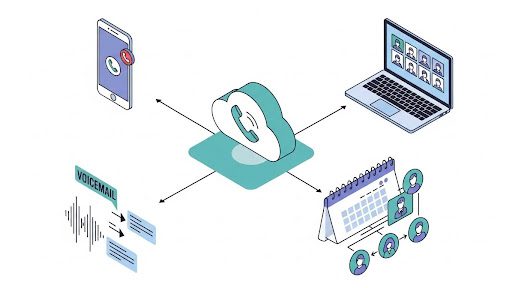
Your team likely conducts business from smartphones already. The best small team VoIP systems embrace this reality rather than fighting it. Mobile apps should replicate the full functionality of desktop applications, allowing users to make and receive calls, check voicemail, and manage settings from anywhere.
Critical here is the ability to use your business number from personal devices without exposing personal phone numbers to customers. This separation protects employee privacy while maintaining professional boundaries. When a team member leaves, their business communications stay with the company rather than following them to their next role.
Video Conferencing Integration
Modern small teams need video capabilities built into their communication stack. Juggling separate subscriptions for phone and video creates complexity and cost that unified solutions eliminate. The best VoIP systems include video conferencing with screen sharing, recording, and participant management features adequate for most small business needs.
Evaluate video quality and participant limits carefully. Some providers advertise video features but cap meetings at durations or participant counts that frustrate regular use. For teams conducting client presentations or internal collaboration sessions, these limitations matter.
AI-Enhanced Features for 2026
Artificial intelligence has become a practical tool in business communications. Current AI implementations offer genuinely useful capabilities for small teams.
Voicemail transcription powered by AI converts spoken messages to readable text with impressive accuracy. This feature saves time and allows quick scanning of message content without listening to recordings sequentially. Some systems now offer call summaries that capture key points from conversations, creating searchable records without manual note-taking.
Intelligent call routing uses AI to analyze incoming calls and direct them appropriately based on caller history, time of day, and team availability. For small teams without dedicated receptionists, this automation ensures customers reach helpful humans rather than endless menu trees.
Top VoIP Providers Compared: What Do Small Businesses Need to Know?
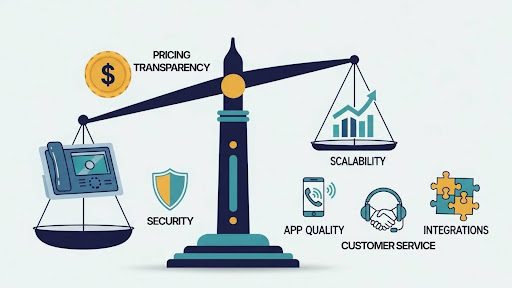
Choosing among top VoIP providers requires looking beyond feature checklists to understand how each system performs in real small business environments. The comparison below focuses on factors that matter most for teams making this decision.
|
Provider Consideration |
What to Evaluate |
Why It Matters for Small Teams |
|
Pricing Transparency |
Are all costs visible upfront? Any per-minute fees? |
Hidden fees destroy budgets; small teams need predictable costs |
|
Contract Requirements |
Month-to-month or annual commitment? |
Flexibility to change if needs evolve |
|
Setup Complexity |
Self-service or professional installation needed? |
Small teams rarely have IT staff for complex deployments |
|
Customer Support |
24/7 availability? US-based? Response times? |
Communication problems can’t wait for business hours |
|
Scalability |
Easy to add/remove users? Cost per additional line? |
Growing teams need systems that grow with them |
|
Mobile App Quality |
Full-featured or limited mobile experience? |
Remote and mobile work demands excellent apps |
|
Integration Options |
CRM, calendar, and productivity tool connections? |
Disconnected systems waste time on manual data entry |
|
Call Quality |
Uptime guarantees? HD voice support? |
Poor call quality damages professional reputation |
|
HIPAA Compliance |
Available for healthcare or sensitive industries? |
Regulated industries need compliant communication |
Evaluating Real-World Performance
Marketing materials tell one story; actual usage tells another. Before committing to any provider, seek out reviews from businesses similar to yours in size and industry. Pay attention to complaints about reliability, customer support, and billing practices rather than focusing only on positive testimonials.
Many providers offer free trials or money-back guarantees that allow testing before full commitment. Use these opportunities to evaluate call quality from multiple locations, test mobile apps under real conditions, and verify that advertised features work as described. The time invested in a thorough evaluation prevents costly switching later.
Understanding Business Phone System Architecture
When evaluating providers, you’ll encounter different delivery models. Purely cloud-based systems require no hardware beyond phones or computers you already own. These systems offer maximum flexibility and the lowest startup costs. Hybrid systems combine cloud features with on-premises equipment, sometimes offering reliability advantages but adding complexity and cost.
For most small teams, fully cloud-based solutions provide the best balance of capability, cost, and simplicity. The scenarios where hybrid or on-premises systems make sense typically involve specific compliance requirements or existing infrastructure investments that hybrid approaches can leverage.
How Can You Choose the Best VoIP Phone System for Your Small Business?
Selection criteria should align with your specific business operations rather than generic best-practice lists. A consulting firm with three partners has different needs than a retail store with shift workers or a healthcare practice with compliance requirements.

Assess Your Actual Communication Patterns
Before evaluating providers, understand how your team currently communicates. Track call volumes, peak times, and common caller needs for a typical week. Note how many team members need direct lines versus shared numbers. Identify any specific features you can’t operate without.
This assessment reveals whether basic plans suffice or whether your usage patterns require higher tiers. Teams making hundreds of calls daily have different needs than those averaging a few dozen. Paying for unlimited calling makes sense for high-volume operations but wastes money for teams with modest call activity.
Prioritize Reliability Over Features
Small teams feel communication failures more acutely than large organizations with redundant systems and dedicated support staff. When your VoIP system goes down, your entire business becomes unreachable. This reality should weigh reliability heavily in provider selection.
Look for providers publishing uptime statistics and offering service level agreements. The industry standard for reputable providers hovers around 99.9% uptime, translating to roughly eight hours of potential downtime annually.
Consider the Total Cost Picture
Monthly per-user fees are only part of VoIP costs. Factor in potential charges for additional phone numbers, toll-free minutes, advanced features, and equipment if you choose desk phones over softphone applications.
Affordable VoIP systems should offer predictable total costs without surprises. Request detailed pricing that includes all fees before committing. Some providers advertise low base rates but recover margin through charges for features that competitors include standard.
Don’t Overlook Customer Support Quality
Technical problems with communication systems require fast resolution. Evaluate provider support options before signing up. Is support available 24/7 or only during business hours? Can you reach humans quickly, or does support route through chatbots and ticket systems?
For small teams without technical staff, responsive customer support is a vital feature. Test support responsiveness during trial periods by submitting questions and noting response times and quality.
What Are Common Mistakes to Avoid When Selecting Affordable VoIP Systems?
Business owners making VoIP decisions for the first time often fall into predictable traps. Learning from others’ mistakes saves time, money, and frustration.
Choosing Based on Price Alone
The cheapest option rarely delivers the best value. Providers offering significantly lower prices than competitors often cut corners on infrastructure, support, or feature depth. These savings evaporate when reliability problems disrupt business operations or when you need support that isn’t available.
Evaluate value rather than price. A system costing $10 more monthly but offering better reliability, superior support, and features you’ll actually use is a better value than bargain alternatives requiring workarounds or causing operational problems.
Overbuying Features You Won’t Use
Enterprise-focused providers sometimes push small businesses toward comprehensive packages with features designed for larger organizations. Contact center capabilities, complex IVR systems, and advanced analytics serve specific purposes but add cost and complexity inappropriate for most small teams.
Match feature sets to actual needs. Start with essential features and upgrade only when genuine business needs emerge rather than preemptively buying capabilities you might someday want.
Ignoring Network Requirements
VoIP calls travel over your internet connection, making network quality directly relevant to call quality. Businesses with unreliable or insufficient bandwidth will experience poor call quality regardless of which provider they choose.
Before switching to VoIP, verify your internet connection can support anticipated call volumes. Each simultaneous call requires approximately 85-100 Kbps of bandwidth. Multiply expected concurrent calls by this figure and ensure your connection provides adequate capacity with headroom for other business activities.
Neglecting Number Portability
Most businesses have established phone numbers that customers, partners, and marketing materials reference. Changing numbers creates confusion and loses the investment in building recognition around existing numbers.
Verify that prospective providers support number porting and understand the timeline and process involved. Reputable providers handle porting smoothly, typically completing transfers within one to two weeks while providing temporary numbers for immediate use.
Frequently Asked Questions
Can I keep my existing business phone number when switching to VoIP?
Yes, number portability regulations require carriers to allow customers to transfer existing numbers to new providers. The porting process typically takes one to three weeks, depending on your current carrier’s responsiveness. Most VoIP providers handle the paperwork and coordination, requiring only your authorization and account information from the existing carrier. Avoid canceling your current service until the port completes to prevent losing your number.
How does VoIP call quality compare to traditional landlines?
Modern VoIP systems using HD voice codecs often deliver better audio quality than traditional landlines when network conditions are adequate. The key variable is internet connection quality rather than the technology itself. With stable, sufficient bandwidth, VoIP calls sound clearer than traditional phone connections. Poor internet connectivity, however, can introduce latency, echoes, or dropped calls that traditional landlines avoid.
Are VoIP systems secure enough for sensitive business communications?
Reputable VoIP providers implement encryption for calls and data transmission, making them suitable for most business communications. Providers serving healthcare organizations often offer HIPAA-compliant configurations with additional security measures and business associate agreements. Evaluate specific compliance needs with prospective providers rather than assuming all systems meet specialized requirements.
What happens to my VoIP phone system if the internet goes down?
Most providers offer failover options that route calls to mobile phones or alternative numbers when primary connections fail. Some systems provide cellular backup that maintains service during internet outages. When evaluating providers, ask specifically about business continuity features and how the system handles connectivity problems.
Power Your Small Team’s Communication in 2026
Selecting the best VoIP phone system for small business involves balancing features, reliability, support, and cost in ways that align with your specific operations. The providers dominating today’s market offer capabilities that seemed impossibly expensive just years ago, democratizing professional communication tools for organizations of all sizes.
Phone.com delivers exactly what small teams need from affordable VoIP systems: reliable service, transparent pricing, and features designed for businesses that can’t afford complexity. With 24/7 US-based support and plans starting at accessible price points, the platform provides a communication foundation that grows alongside your business. Explore Phone.com’s plans and discover how modern business phone systems can transform your team’s connectivity without breaking your budget.